



NowAIKit
Get started
Use cases Pricing Docs Contact Get started
Browser extension Standalone product · v1.2.0 Free & source available

Utils: the ServiceNow browser command center

Your AI-powered ServiceNow command center

AI Assistant with multi-provider support, A2A agent discovery, CMDB relationship visualizer, incident timeline view, code templates, slash commands, node switcher, two-way script sync with VS Code, Fluent project detector, and enterprise-grade encrypted storage. The most comprehensive ServiceNow browser extension, free and source available.


nowaikit · utils BYOK
NowAIKit UTILS product banner NowAIKit UTILS product banner
In the browser

The panel slides in, context comes with it

Utils reads the record on screen, so the AI answers about your form, your table, your script. Bring your own key from any of 5 providers.
acme.service-now.com/incident.do?sys_id=a1b2c3UTILS ON
The real thing
acme.service-now.com/incident.do?sys_id=a1b2c3
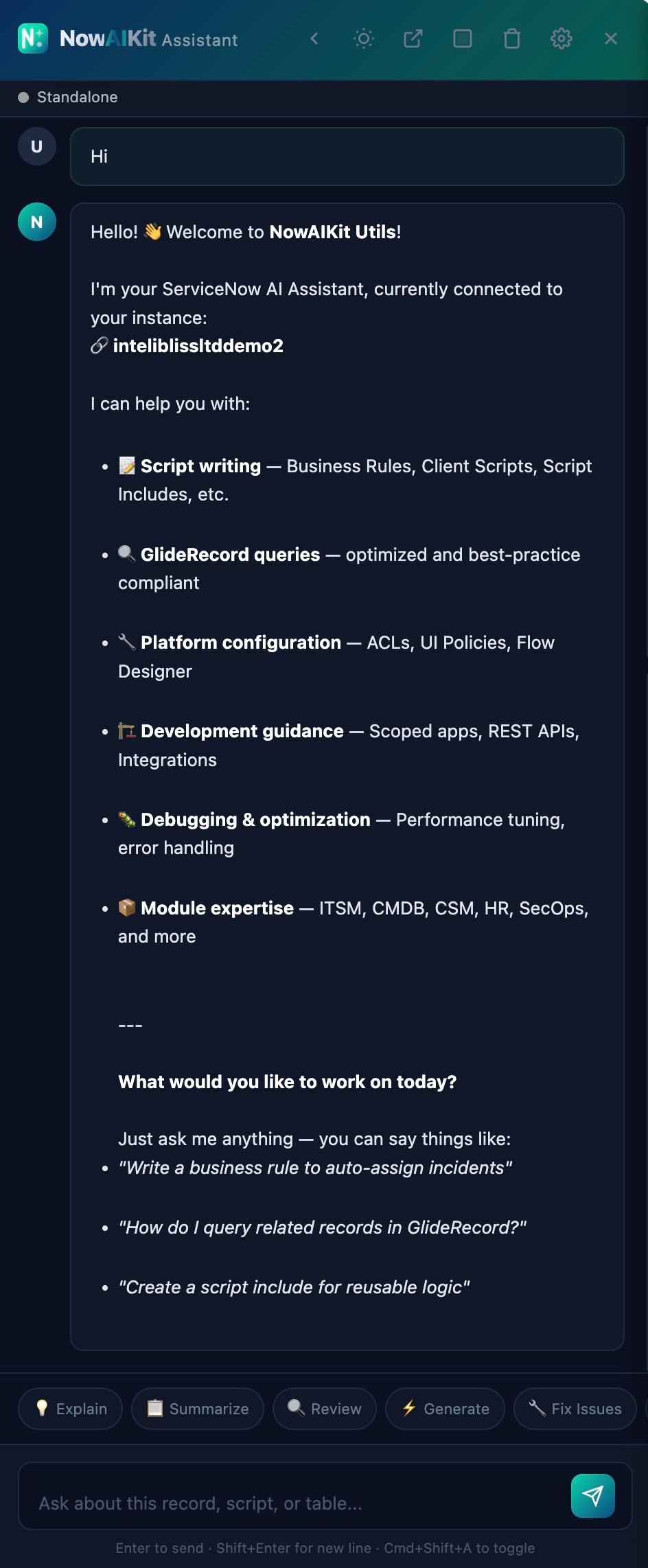
NowAIKit Utils AI Assistant, context-aware AI chat with quick actions
AI assistant

Context-aware AI that understands your instance

Chat with AI about the current record, table, or script. The assistant automatically gathers form fields, script content, and table schema to provide contextual, accurate responses.

Bring your own key: choose from 5 providers including local Ollama for air-gapped environments. Streaming responses with code highlighting, one-click copy, and direct insert into ServiceNow script editors.

OpenAIAnthropicGoogleOpenRouterOllama (Local) Quick ActionsStreaming ResponsesCode InsertPop-out WindowEncrypted Keys
Code templates

Production-ready templates, one keystroke away

Searchable library of GlideRecord, GlideQuery, Business Rule, Client Script, REST, and common pattern templates. Filter by category, search by name, and insert directly into any ServiceNow script editor.

Create custom templates for your team's patterns. One-click "Run in Background" opens Background Scripts and auto-pastes the code. Full syntax highlighting with ServiceNow API recognition.

GlideRecordGlideQueryClient ScriptsBusiness RulesPatternsRESTCustom Templates
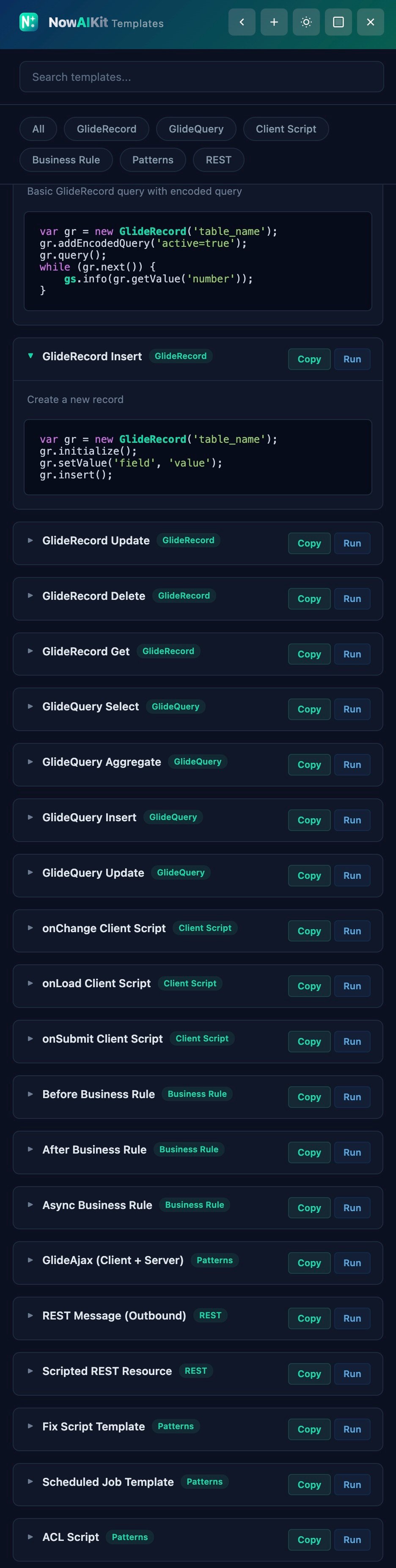
Code Templates — Ctrl+Shift+T
NowAIKit Utils Code Templates, 22+ production-ready templates
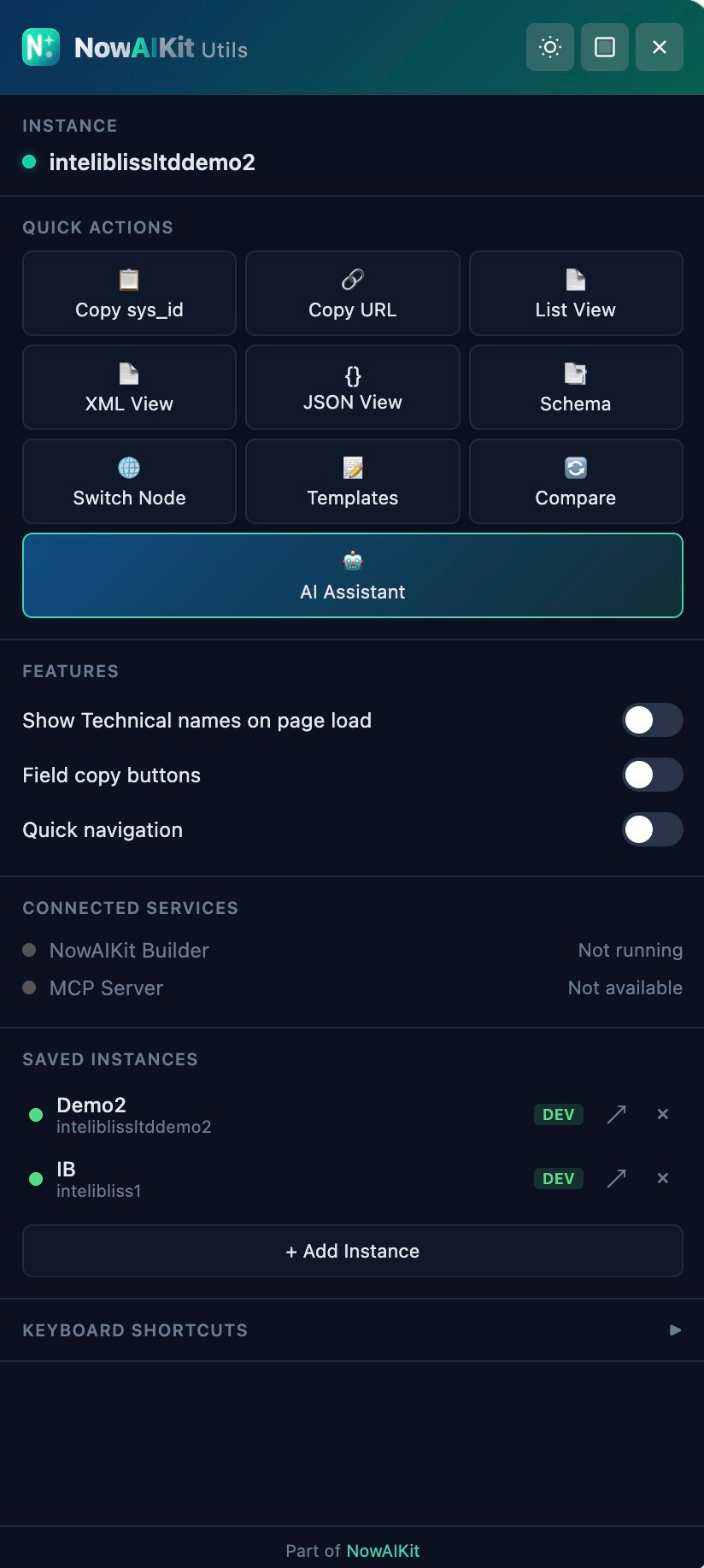
Main Panel — Ctrl+Shift+P
NowAIKit Utils Main Panel, command center with quick actions and feature toggles
Command center

Everything you need, one panel away

The Main Panel (Ctrl+Shift+P) is your ServiceNow command center. Instance info, 9 quick actions, feature toggles, and connected service status, all in a dockable, draggable, resizable panel.

Plus the Browser Side Panel keeps the extension popup persistent in the browser sidebar. No more losing your place when you click away.

Quick ActionsFeature TogglesService StatusDock / Float / ResizeSide Panel
Node switcher

Cluster-aware node switching

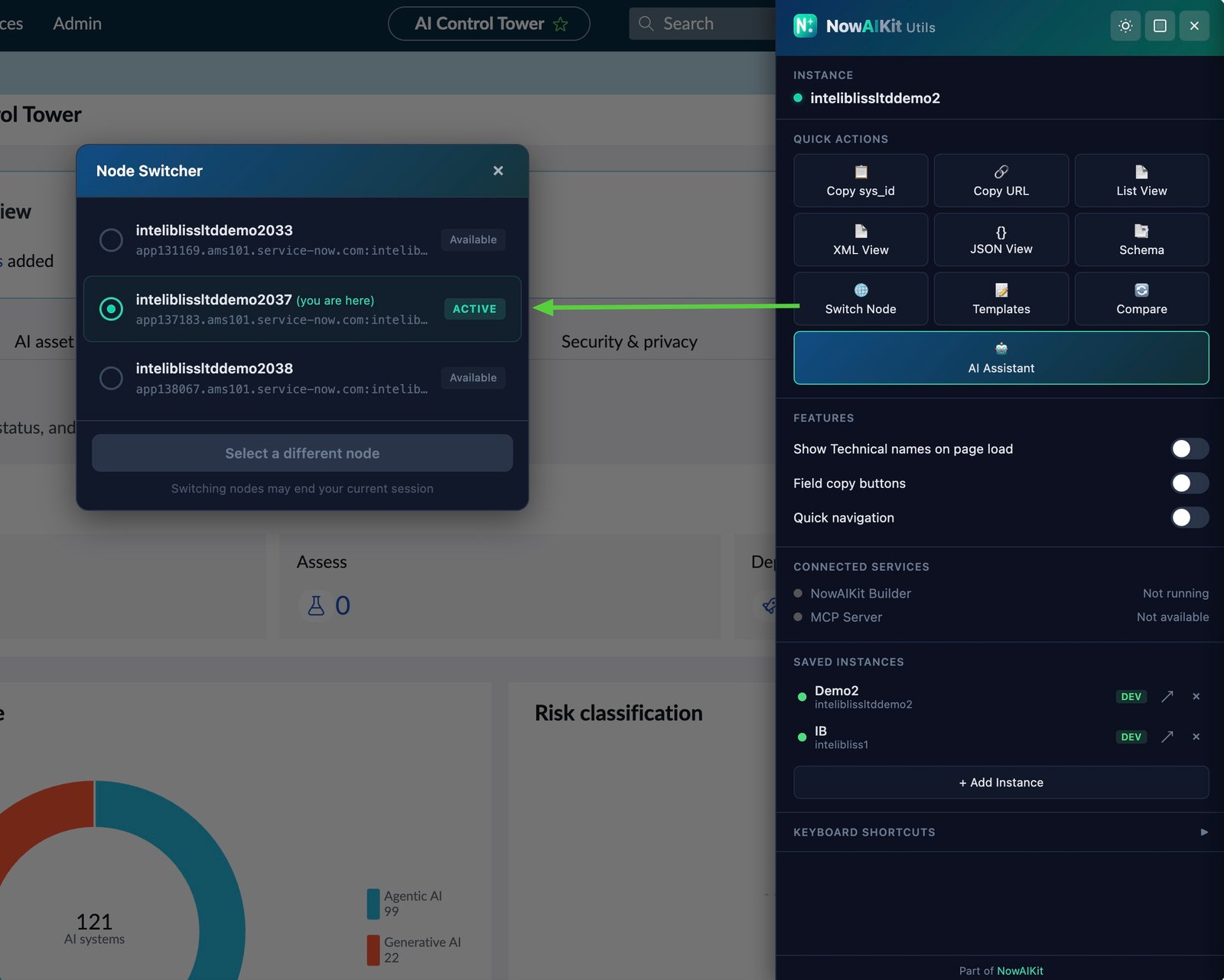
Instantly switch between application nodes for debugging, testing, or load verification. Discovers all cluster nodes via sys_cluster_state with 4 cascading fallback strategies.

Handles F5 BIG-IP load balancers (Classic + ADCv2), sets glide_user_route cookies, and shows real-time node status. Essential for multi-node debugging.
Cluster DiscoveryF5 BIG-IP SupportMultiple Fallback StrategiesCookie Management
Node Switcher — Ctrl+Shift+N
NowAIKit Utils Node Switcher, cluster-aware node switching
Complete feature set

Everything you need to transform your browser

Every feature a ServiceNow admin and developer needs. All features are off by default: enable only what you need for zero performance impact.

AI Assistant (BYOK)In-browser AI sidebar with multi-provider support (OpenAI, Anthropic, Google, OpenRouter, Ollama). Context-aware chat about records, tables, scripts. Quick actions, streaming responses, code insert, pop-out window.
Code Templates LibraryBuilt-in templates across multiple categories: GlideRecord, GlideQuery, Client Scripts, Business Rules, Patterns, REST. Create custom templates. One-click copy or run in Background Scripts.
Two-Way Script SyncWebSocket bridge to NowAIKit Builder (VS Code). Edit scripts in the browser and see changes in VS Code, or edit in VS Code and see them in the browser. Real-time, bidirectional.
Node SwitcherSwitch between application nodes with cluster-aware discovery via sys_cluster_state. F5 BIG-IP support (Classic + ADCv2). Multiple fallback strategies for any environment.
Slash Command BarSlash commands in the Quick Nav bar: /docs, /api, /script, /us, /node, /env, /diff, /bg, /log, /tables. Also accepts sys_ids, table names, and direct URLs.
Main PanelFloating command center with instance info, quick actions, feature toggles, and connected service health. Dockable, draggable, resizable.
Technical Name ResolverShows technical (API) field names next to labels on every form. Multiple detection strategies for Classic, Polaris, and Workspace UIs.
Multi-Instance ManagementSave instances with aliases, color-coded environments (Dev/Test/Staging/Prod), hierarchical groups. One-click switch. Synced across devices via browser sync.
Syntax HighlightingOverlay-based highlighting for script editors. Recognizes ServiceNow APIs and JS keywords. Works with CodeMirror and textarea editors, auto-syncs scroll.
Update Set BannerAlways-visible banner showing current update set and scope. Multiple detection strategies including REST API fallback. Never accidentally work in the wrong update set.
Copy EverythingOne-click copy for sys_id, record URL, table name, field values, and technical names. Right-click context menu items. Visual toast confirmation.
Record Info OverlayFloating panel showing table, sys_id, instance, and current node. Click to copy values. Click node name to open Node Switcher.
Browser Side PanelPin the extension as a persistent browser sidebar using the Side Panel API. All popup features without the close-on-click-away limitation.
Quick NavigationCommand palette with slash commands, sys_id navigation, table name lookup, and direct URL input. Fuzzy, fast, keyboard-first.
Field Type TooltipsHover over fields to see type, max length, and mandatory status. Fetches metadata from sys_dictionary with per-table caching.
Connected ServicesLive integration status for NowAIKit Builder (VS Code) and MCP Server. Auto-connect with exponential backoff. Table schemas and record context flow automatically.
SPA Navigation SupportWorks with Next Experience and Agent Workspace single-page apps. Patches history.pushState/replaceState, monitors popstate, and polls URLs as fallback.
Dark & Light ThemesConsistent dark/light mode across all panels. Auto-detects ServiceNow's theme. WCAG AA contrast compliance. Toggle from any panel or popup.
Enterprise SecurityAES-256-GCM encrypted key storage, CSP headers, domain-scoped permissions, input validation, XSS prevention, zero telemetry.
Background Script Auto-PasteSend code to Background Scripts from templates or AI. Code auto-pastes into the editor when the page loads, then self-cleans from storage.
Keyboard ShortcutsCtrl/Cmd+Shift combos for every common action: copy, navigate, toggle panels, open AI, templates, node switcher. Zero mouse required.
A2A Agent DiscoveryBrowse and interact with A2A-compatible agents directly from the browser. Discover available agents, view their capabilities, and trigger agent-to-agent workflows from any ServiceNow page.
CMDB Relationship VisualizerCanvas-based interactive graph showing CI relationships. Zoom, pan, and explore upstream/downstream dependencies directly from any CMDB record. Renders on HTML5 Canvas for smooth performance.
Incident Timeline ViewVisual timeline of incident activity: comments, work notes, state changes, and SLA milestones rendered chronologically. Quickly understand the full history of any incident at a glance.
Fluent Project DetectorAutomatically detects Fluent SDK projects on connected ServiceNow instances via now.config.json. Surfaces project metadata and enables Fluent-aware AI assistance in the browser sidebar.
AI providers

Bring your own key: multi-provider AI

Choose any AI provider. Your keys are AES-256 encrypted. Chat goes directly to your provider over HTTPS, never through our servers.

OpenAI GPT-5.4, GPT-5.4 Mini,
GPT-5.4 Nano
Anthropic Claude Opus 4, Sonnet 4,
Haiku 4.5
Google Gemini 3.1 Pro, 3 Flash,
2.5 Flash, 2.5 Pro
OpenRouter Claude, GPT, Gemini, Llama,
Qwen, DeepSeek
Ollama (Local) Qwen3, DeepSeek-R1,
Llama 3.3, air-gapped
Slash commands

Slash commands in the quick nav bar

Press Ctrl+Shift+K to open Quick Navigation, then type a slash command to jump instantly.

CommandAction
/docsOpen ServiceNow documentation
/apiOpen REST API Explorer
/scriptOpen Background Scripts
/usOpen Update Sets list
/nodeOpen Node Switcher modal
/envOpen System Properties
/diffOpen Update Set XML diff
/bgOpen Background Scripts (alias)
/logOpen System Log
/tablesOpen Table list (sys_db_object)
{sys_id}Navigate to record by 32-char hex ID
{table_name}Open list view for any table
Keyboard shortcuts

Navigate at the speed of thought

Keyboard shortcuts for zero-mouse navigation. All use Ctrl+Shift (Cmd+Shift on Mac).

CtrlShiftKQuick Navigation: slash commands, sys_id, table lookup
CtrlShiftAAI Assistant: context-aware chat about the current page
CtrlShiftTCode Templates: search, filter, insert
CtrlShiftPMain Panel: quick actions, toggles, service status
CtrlShiftNNode Switcher: cluster-aware node switching
CtrlShiftCCopy sys_id of the current record
CtrlShiftUCopy full URL of the current record
CtrlShiftLOpen list view for the current table
CtrlShiftXView current record as XML
CtrlShiftJView current record as JSON via REST API
Security

Secure by default

Enterprise-grade practices built into every layer. A browser extension you can trust.

AES-256-GCM encrypted key storageAI provider API keys are encrypted using AES-256-GCM before storage. Keys are derived via PBKDF2 with 100,000 iterations using the extension's unique runtime ID. No plaintext credentials ever stored.
Content Security PolicyStrict CSP headers: script-src 'self'; object-src 'self'. No inline scripts or remote code loading, eliminating XSS attack vectors.
Domain-scoped permissionsOnly activates on *.service-now.com and *.servicenow.com. All URL construction, cookie operations, and navigation are validated against ServiceNow domain patterns.
Zero telemetryNo analytics, no tracking, no external data transmission. AI chat goes directly to your provider over HTTPS. All processing happens locally in your browser.
Input validation & sanitizationTable names, sys_ids, instance URLs, CSS selectors, and field names are all validated with strict regex patterns. HTML is escaped throughout to prevent injection.
Sender verificationThe background service worker verifies sender.id === chrome.runtime.id on every message, preventing cross-extension message spoofing.
Ecosystem

Part of the NowAIKit ecosystem

NowAIKit Utils connects to the entire NowAIKit product family for an integrated AI-powered ServiceNow development experience.

Browser ↔ VS Code syncEdit scripts in ServiceNow and changes appear in VS Code instantly. Edit in VS Code and they're reflected in the browser. WebSocket bridge with auto-reconnect.
AI Assistant + MCP dataWhen Builder is connected, the AI sidebar gets live table schemas, record data, and instance health from the MCP server for richer, more accurate responses.
Connected dashboardMain Panel shows real-time connection status for Builder and MCP Server. Know instantly when your full development environment is connected and ready.
Setup guide

Connect the NowAIKit ecosystem

The Main Panel shows connection status for Builder and MCP Server. Here is how to set them up.

NowAIKit Builder (VS Code) Script Sync

When Builder is connected, you get two-way script sync between your browser and VS Code, plus richer AI context from table schemas and record data.

1
Install NowAIKit Builder in VS Code. Search for NowAIKit Builder in the VS Code Extensions marketplace, or install via CLI:
code --install-extension aartiq.nowaikit-builder
2
Start the WebSocket Bridge. Open the VS Code Command Palette (Cmd+Shift+P) and run:
NowAIKit: Start Bridge Server
Default port: 8765. Configurable in VS Code settings.
3
Open a ServiceNow page. Utils auto-detects Builder on page load. The Main Panel (Ctrl+Shift+P) will show Connected next to NowAIKit Builder. Script edits now sync bidirectionally.
NowAIKit MCP Server AI Context

When the MCP Server is connected, the AI Assistant gets enriched context: live table schemas, record metadata, and instance configuration flow directly into your chat.

1
Install and start the MCP server.
npx nowaikit@latest
Or configure it in your AI client's MCP settings (Claude, Cursor, etc).
2
Builder bridges the connection. The MCP Server connects through NowAIKit Builder's WebSocket bridge. Make sure Builder is running and connected first (see steps on the left).
3
Check connection status. Open the Main Panel (Ctrl+Shift+P). The Connected Services section shows real-time status for both Builder and MCP Server. Green = connected, auto-reconnect handles network interruptions.
Note: the MCP Server status shows "Not available" when Builder is not running. Start Builder first, then the MCP bridge activates automatically.
Installation

Three ways to get started

npm / npx Install via npm for the latest version. The package includes a CLI that prints setup instructions and opens the extension folder.
npx nowaikit-utils
Browser web store One-click install from your browser's web store. Works with Chrome, Edge, Brave, Arc, and all Chromium-based browsers. Auto-updates. Available soon →
Developer mode Clone the repo and load as an unpacked extension. Ideal for contributors and custom modifications. Contact us for early access →
Questions

Frequently asked questions

Browser support

Available soon on your favourite browser

Store listings are under review. Get early access today by contacting us directly.

Chrome Coming soon
Edge Coming soon
Firefox Coming soon
Safari Planned
Brave, Arc & more All Chromium

Want to try it before store launch? We will send you the extension directly.

Request early access

More from the NowAIKit ecosystem

Utils works standalone or together with the full NowAIKit ecosystem.

Ready to supercharge your ServiceNow browser?

Every feature you need. Keyboard shortcuts, slash commands, code templates, multi-provider AI, enterprise security, zero telemetry. Free and source available, early access rolling out now.