



Builder: ServiceNow development, inside VS Code
The complete ServiceNow development experience in VS Code
AI-powered code generation with Fluent SDK support, real-time script sync, update set and scope management, instance dashboard, A2A agent discovery, and multi-instance OAuth support, all without leaving your editor. Full IntelliSense, snippets, and two-way script sync.
ext install aartiq.nowaikit-builder


Write a comment, get the script
Completions that understand ServiceNow, a live script tree, and 40+ commands one palette away.

Built for real ServiceNow work
Every feature is designed around how ServiceNow developers actually work, not how tools think they should.
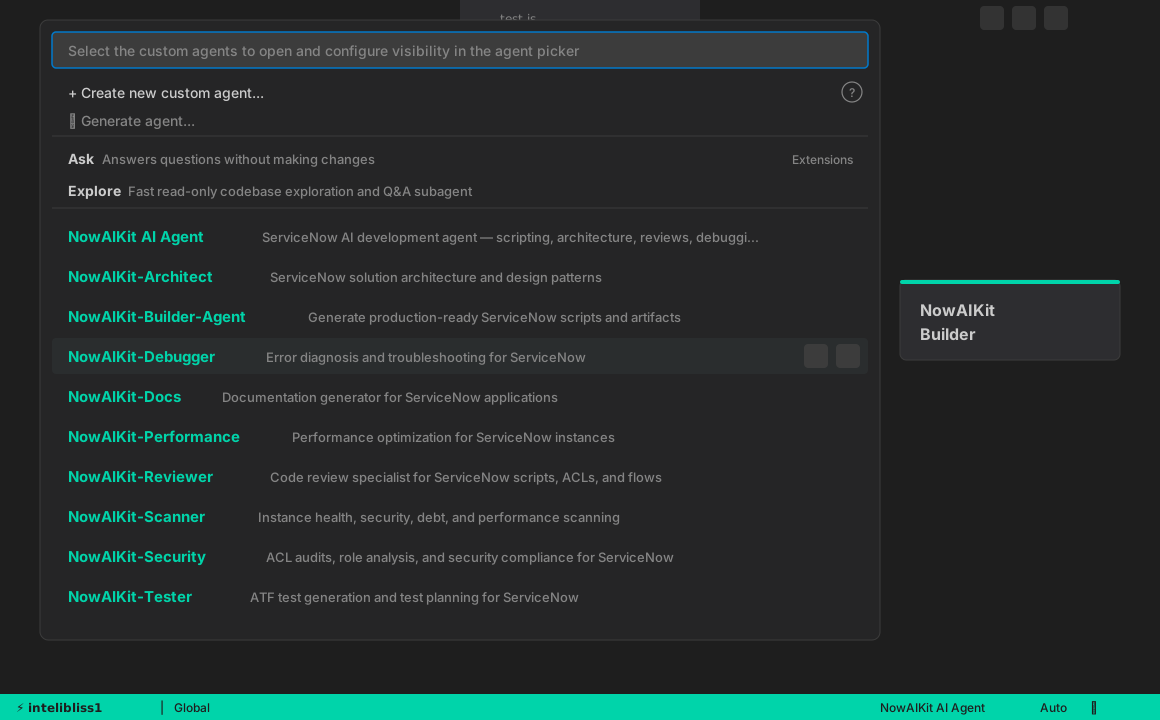
Specialized AI agents for every task
Not one generic AI: a team of specialized agents, each trained on a specific ServiceNow domain. Ask @nowaikit-build to scaffold a business rule, @nowaikit-scan to audit your instance, or @nowaikit-debug to trace an error.
Diff, compare and merge across instances
Compare any script version side-by-side with full syntax-highlighted diff. Pull version history, compare across instances, and get an AI-generated summary of exactly what changed and why it matters.
Side-by-Side DiffVersion HistoryCross-Instance CompareAI Change Summary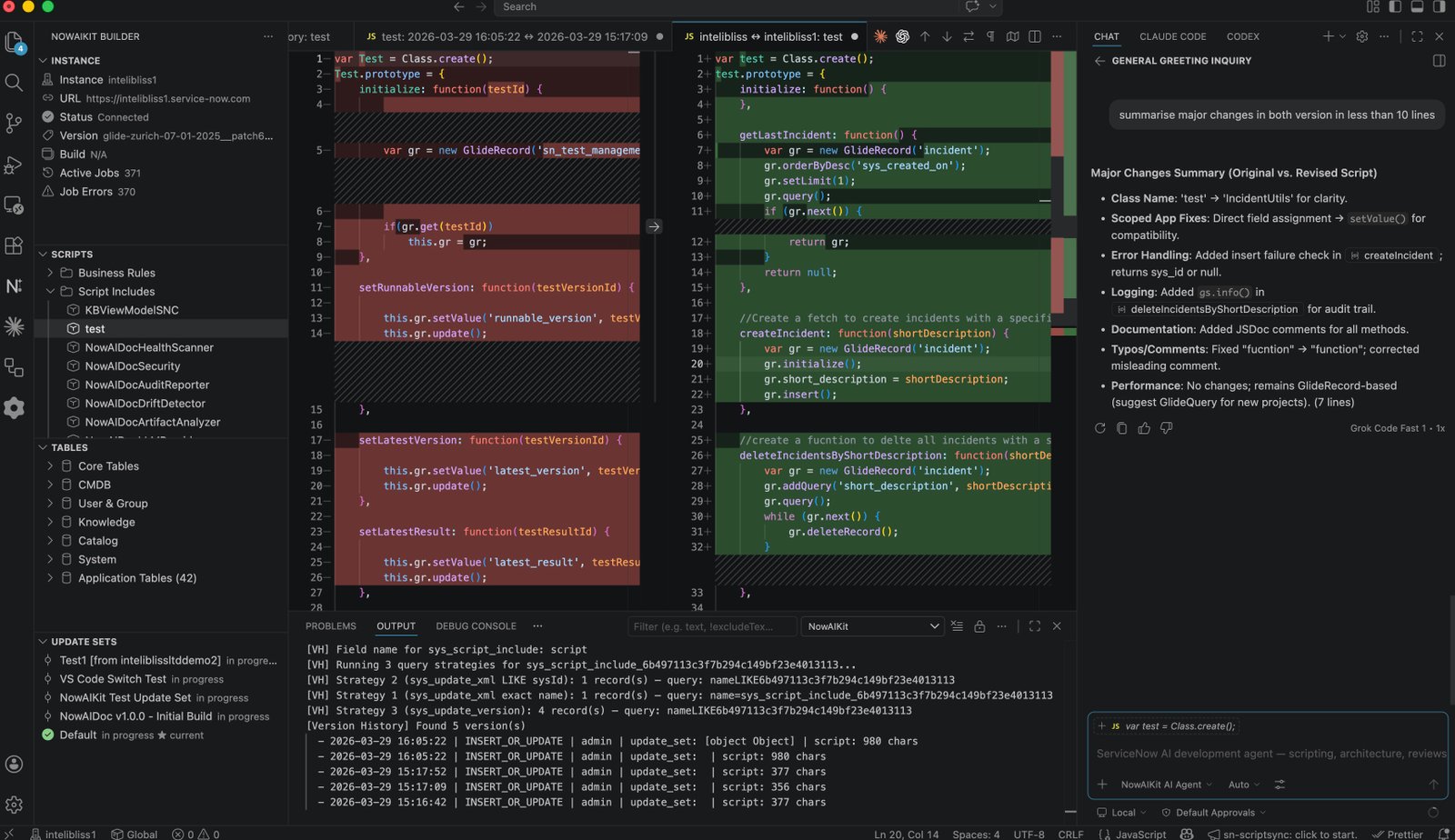
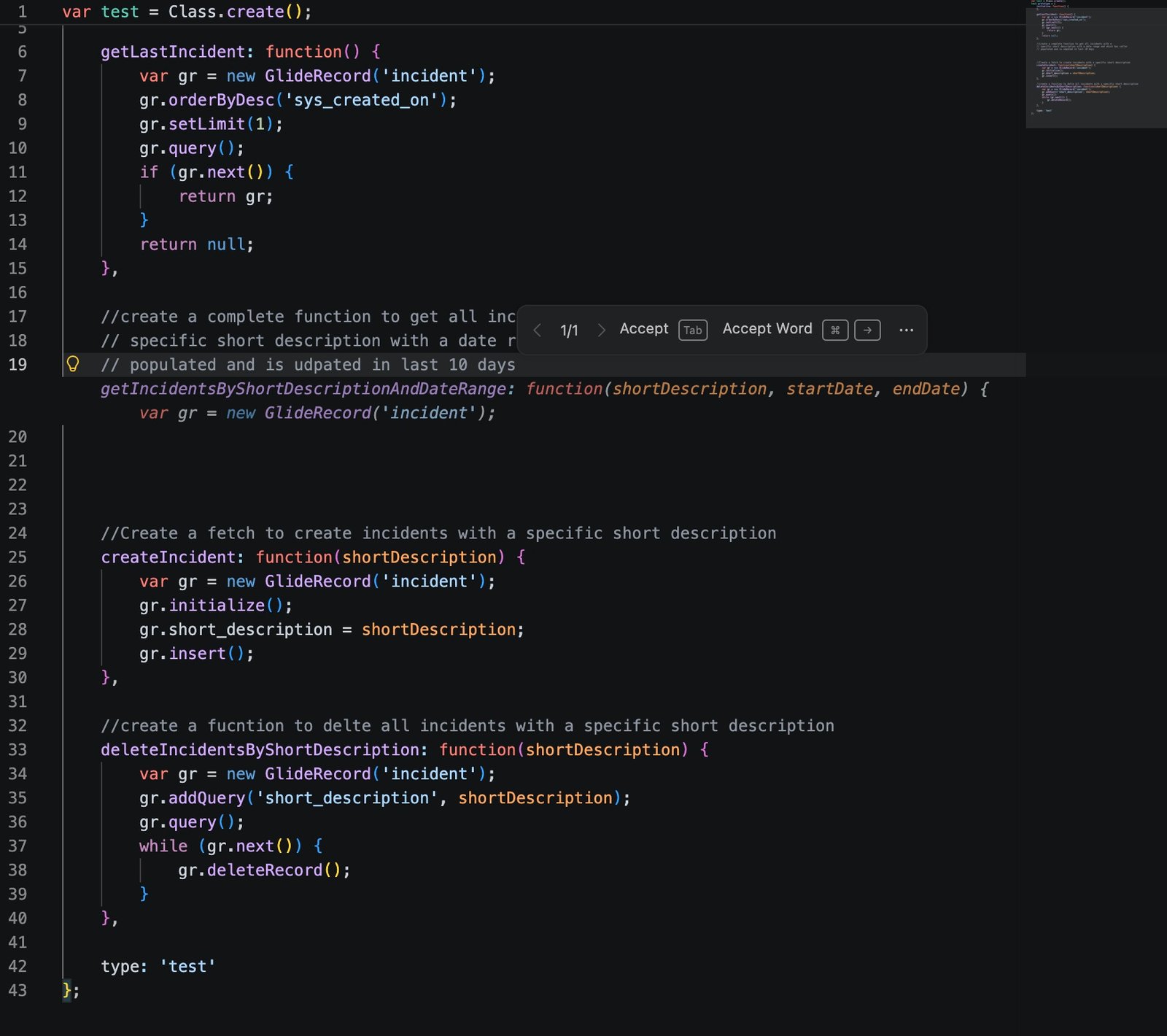
ServiceNow-aware inline suggestions
Copilot completions that actually understand ServiceNow APIs. Write a comment describing what you need and get accurate GlideRecord queries, Script Include patterns, and Business Rule logic, with correct table names, field references, and API calls.
GlideRecord PatternsContext-AwareTab to AcceptMulti-LineRight-click, get things done
Every script in the explorer gets contextual actions tailored to real workflows. Compare across instances, view version history, promote to another instance, open in the browser, or copy the sys_id, all from the right-click menu.
Compare Across InstancesVersion HistoryPromote ScriptOpen in BrowserCopy sys_id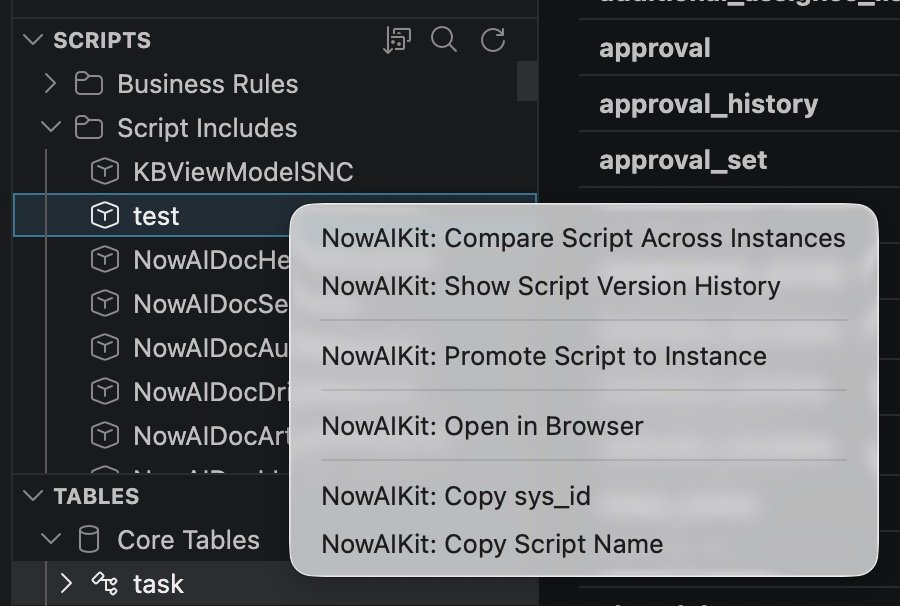
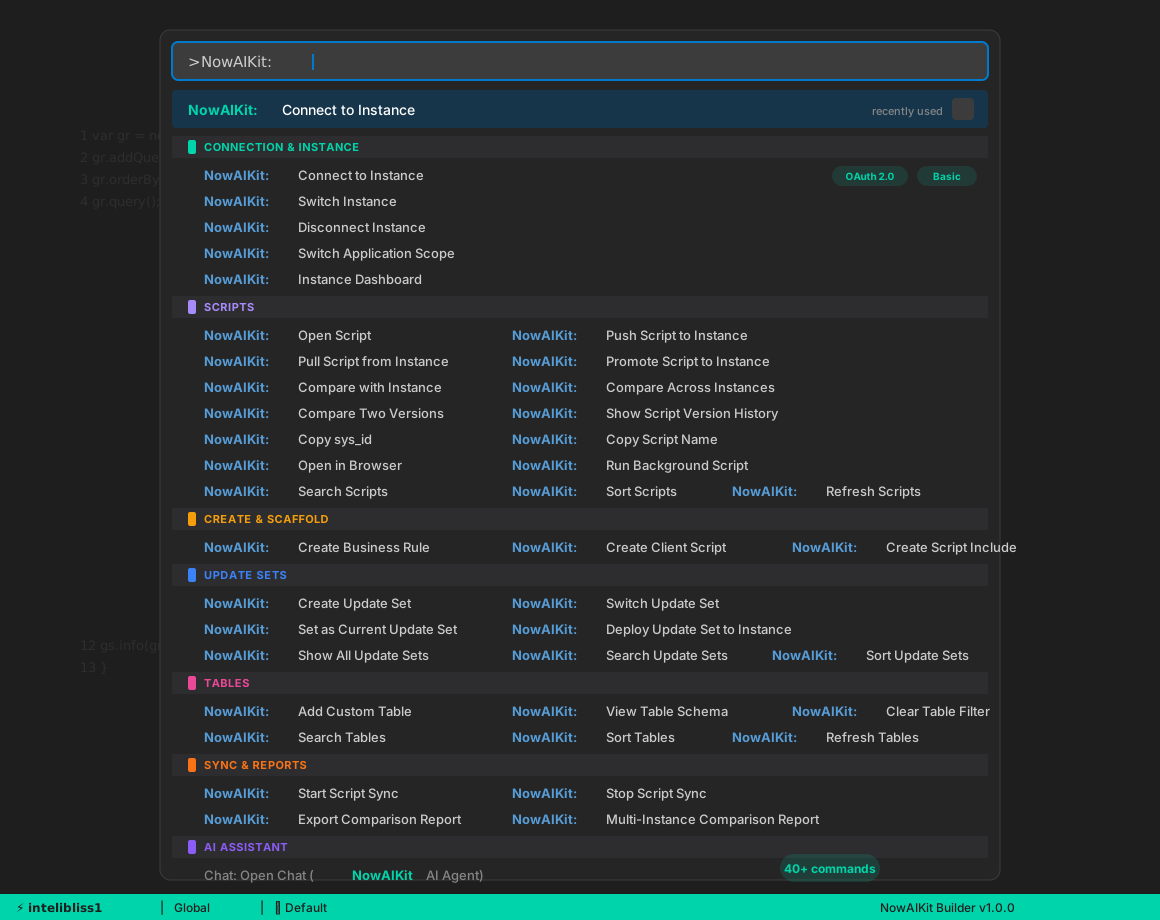
Your one-stop AI-powered coding assistant
Over 40 commands covering every aspect of ServiceNow development, from connecting to an instance to deploying update sets. Accessible from the Command Palette, context menus, and keyboard shortcuts. No switching between browser tabs, no manual API calls, no context loss.
Connection & AuthScript ManagementCreate & ScaffoldUpdate SetsTables & SchemaReal-Time SyncCompare & DiffReportsAI ChatEverything you need to build on ServiceNow
Script management, AI-powered development, update set control, and deep instance intelligence, without leaving your editor.
@nowaikit-fluent for Fluent SDK workflows and @nowaikit-a2a for agent orchestration.Complete command reference
Ctrl+Shift+P (Cmd+Shift+P on Mac). Every operation you need, organized by workflow.
Connect to Instance | Basic Auth or OAuth 2.0 with MFA/SSO |
Disconnect Instance | Safely disconnect from the current instance |
Switch Instance | Switch between saved instances |
Switch Application Scope | Change scope and filter update sets |
Instance Dashboard | Version, jobs, errors, and trends |
Create Business Rule | Scaffold on the connected instance |
Create Client Script | With form type selection |
Create Script Include | With class pattern |
Open Script | Open as local file with IntelliSense |
Push Script to Instance | Push local changes back |
Pull Script from Instance | Pull the latest version |
Promote Script to Instance | Push to a different target instance |
Compare with Instance | Side-by-side diff |
Compare Across Instances | Same script, two instances |
Compare Two Versions | Any two versions from history |
Show Script Version History | Browse all versions with timestamps |
Open in Browser | Jump to the record in ServiceNow |
Copy sys_id | Copy sys_id to clipboard |
Copy Script Name | Copy name to clipboard |
Run Background Script | Execute server-side with scope selection |
Search / Sort / Refresh | Filter, reorder, and reload the script tree |
Create Update Set | New set with name and description |
Switch Update Set | Auto browser session invalidation |
Set as Current Update Set | Set any set as current |
Deploy to Instance | Deploy update set to a target |
Show All Update Sets | View with scope and status |
Search / Sort / Refresh | Filter, reorder, and reload sets |
Add Custom Table | Add any table by name |
View Table Schema | Fields, types, references, constraints |
Clear Table Filter | Reset and show all categories |
Search / Sort / Refresh | Filter, reorder, and reload tables |
Start / Stop Script Sync | Real-time WebSocket with NowAIKit Utils |
Export Comparison Report | Diff report as HTML or text |
Multi-Instance Comparison | Compare across multiple instances |
Focus on Instance View | Instance panel |
Focus on Scripts View | Scripts tree |
Focus on Tables View | Tables tree |
Focus on Update Sets View | Update sets panel |
Type a prefix, press Tab, done
Production-ready code patterns. Type the prefix, press Tab, fill in the blanks.
gr→GlideRecord query with while/nextgrenc→GlideRecord with encoded querysgr→Scoped app GlideRecordga→GlideAggregate COUNT/SUM/AVGajax→GlideAjax client-side callsi→Script Include class scaffoldbrbefore→Before Business Rulebrafter→After Business Rulerest→RESTMessageV2 outbound callflowaction→Flow Designer action stepgsinfo→gs.info / gs.error logginguiaction→UI Action with condition guardcsload→Client Script onLoad handlercschange→Client Script onChange handleratf→ATF test step scaffoldwidget→Service Portal widget scaffoldFour steps to productive development
From install to coding in under two minutes.
ext install aartiq.nowaikit-builder from the Command Palette.
Ctrl+Shift+I) and type @nowaikit to ask anything about ServiceNow. 10 specialized agents with deep platform knowledge.
Frequently asked questions
Part of the NowAIKit ecosystem
Builder works standalone or together with the full NowAIKit ecosystem.
Ready to build on ServiceNow in VS Code?
Install the extension and start developing in under two minutes. Free and source available with the NowAIKit suite.